

LinkedIn automation tools are your revenue team's most underused competitive advantage when used correctly. This guide cuts through the noise to show you exactly which tools work, for whom, and why.
If you've spent any time in B2B sales or growth, you already know the LinkedIn grind: manually sending connection requests, copy-pasting follow-ups, losing track of who replied. It's slow, inconsistent, and doesn't scale.
LinkedIn automation tools solve this. The best ones handle repetitive execution so your team can focus on strategy, high-value conversations, and closing deals, not inbox management.
There's a right way and a wrong way to use them.
Lazy automation blasting generic messages at high volume gets accounts restricted and burns your budget. Smart LinkedIn automation builds pipelines by reaching the right people, at the right moment, with the right message.
In this guide, we break down the best LinkedIn automation tools for 2026 across every category: outreach, prospecting, data enrichment, multichannel sequences, and GTM intelligence. For each tool, you'll get a clear breakdown of what it does, who it's built for, where it falls short, and current pricing so you can make the right call for your team's stage and goals.
What are LinkedIn Automation Tools?
LinkedIn automation tools are software platforms that perform actions on LinkedIn on your behalf, from sending connection requests and follow-up messages to extracting lead data, scheduling content, and monitoring competitor activity.
The best GTM and revenue teams in 2026 don't treat these tools like hacks. They treat them like operational infrastructure, systems that handle repetitive execution while people focus on strategy and relationship-building.
What LinkedIn Automation Tools Can Help You Do
1. LinkedIn outreach tools
Automate connection requests, follow-ups, sequences, basic inbox workflows, and sometimes posting.
2. LinkedIn prospecting tools
Extract and organize lead data from LinkedIn and Sales Navigator so you can build lists, enrich records, and feed your outbound systems.
3. Engagement on autopilot
Some tools assist with likes, comments, and shares to help keep a profile active. Use these sparingly as fake-looking engagement patterns are a detection risk.
4. LinkedIn content tools
Plan content, write better posts, schedule consistently, and analyze what's actually driving audience growth.
LinkedIn's Stance on Automation in 2026 and Why Account Safety Matters
LinkedIn doesn't support third-party automation and is especially sensitive to spammy behavior that degrades the platform experience.
That said, the reality is more nuanced.
LinkedIn's primary concern is not automation itself. It's low-quality, intrusive automation: volume spikes, repetitive behavior, actions that happen too fast, and copy-paste messaging sent at scale. Teams that stay within human-like usage patterns rarely run into issues.
This is why the best LinkedIn automation tools are built around:
- Keeping activity inside human-like daily thresholds
- Randomizing send timing so patterns don't repeat
- Auto-stopping sequences the moment someone replies
- Maintaining consistent, structured operations across accounts
Bottom line: In 2026, the number one goal of any automation strategy is protecting your account. Any tool or tactic that puts your LinkedIn account at risk is not worth the pipeline it might generate.
Types of LinkedIn Automation Tools
Cloud-Based vs. Browser-Based Tools: Which Is Safer?
LinkedIn flags behavior patterns, not tool architecture. A cloud-based tool used aggressively is riskier than a browser extension used conservatively. Safe usage matters more than the tool type.
7 LinkedIn Automation Mistakes That Get Accounts Banned in 2026
Mistake 1: Sending Too Many Connection Requests Too Fast
The safe limit is 20 to 40 connection requests per day per account. New accounts should start at 10 to 15 per day and ramp up over 2 to 4 weeks.
Hitting 100 or more on day one is the fastest path to a restriction notice. LinkedIn's algorithm learns your behavior patterns quickly and flags sudden volume spikes as suspicious activity.
Mistake 2: Using the Same Message Template for Every Prospect
LinkedIn's algorithm detects repetitive message patterns across accounts.
Rotate your opening lines, vary your value propositions, and always include at least one personalization token in the first line of every message.
First name, company name, a recent post they published, or a mutual connection all work. Generic openers sent at scale are one of the top triggers for outreach restrictions in 2026.
Mistake 3: Running LinkedIn Automation 24/7
Humans don't send LinkedIn messages at 3am. Schedule your automation to run only during business hours in your target timezone. Cloud-based LinkedIn automation tools make this straightforward with built-in time window settings. Browser extensions often don't enforce time windows at all, which is one of the reasons they carry higher detection risk.
Mistake 4: Not Stopping Sequences When Someone Replies
If someone responds and your automation sends them another follow-up anyway, you've destroyed the relationship before it started. Every LinkedIn automation tool on this list should have auto-stop on reply enabled by default. Confirm this setting is active before any campaign goes live, not after.
Mistake 5: Logging Into LinkedIn From Multiple Locations
Using a cloud tool while also manually logging in from a different IP address confuses LinkedIn's login pattern detection. Use your dedicated IP consistently. If you need manual access alongside your automation tool, set up a separate LinkedIn session or browser profile specifically for manual use to keep the IP patterns clean.
Mistake 6: Skipping Profile Warm-Up Before Activating Automation
Running automation from a brand-new or underbuilt LinkedIn profile is a red flag for LinkedIn's detection systems. Spend 2 to 4 weeks engaging organically before activating any automation. Post content, comment on posts in your niche, and build your connection count past 100 first. A warmed-up profile dramatically reduces restriction risk when you scale.
Mistake 7: Ignoring Your Connection Request Accept Rate
If fewer than 20% of your connection requests are being accepted, your targeting is off or your opening message is the problem, not the tool. Stop the campaign, audit your ICP filters, rewrite your opening line, and run a small 50-contact test batch before scaling back up. Accept rate is the single most telling signal of whether your outreach is landing or getting ignored.

Category 1: GTM and Revenue Intelligence Tools (Best for Competitive Teams)
If your challenge is not "sending more messages" but rather "finding the right opportunities at the right moment," this is where your stack should start.
1. NRev AI - GTM AI Agent Engine
Most LinkedIn automation tools help you do more outreach. NRev is built for something different: helping GTM and revenue teams find better opportunities, faster, by using LinkedIn as a live signal engine.
If you're a GTM leader, RevOps manager, or sales team operating in a competitive category, your real challenge in 2026 is not sending messages. It's:
- Spotting the right accounts at the right moment
- Identifying who's active and most likely to respond
- Catching competitor moves before they land the deal
- Turning those signals into action your team can execute immediately
That's exactly what NRev AI is built for.
What NRev Automates (That Most LinkedIn Tools Don't)
Instead of running basic sequences, NRev runs LinkedIn-focused GTM playbooks that combine signal detection, AI-powered ICP qualification, ranked prospect prioritization, real-time Slack alerts for your team, and reporting into Sheets or databases for long-term intelligence.
NRev AI LinkedIn Use Cases
Discovers competitor SDR and BDR profiles, monitors their public engagement activity, detects which prospects competitors are circling, and fires real-time Slack alerts when there's a high-intent ICP match in your target market.
An always-on weekly workflow that finds posts mentioning your competitors, filters by engagement quality (25 or more likes), and delivers a curated intelligence report so your team can engage where it matters most before your competitors do.
3. LinkedIn Engagement Score Ranking
Pulls target account contacts, fetches 3 months of activity data, calculates weighted engagement scores (posts rank higher than reactions), and ranks prospects so reps always start their outreach with the most reachable people.
4. ICP Comment Evangelist
Finds viral posts by ICP prospects, verifies company fit, drafts thoughtful comment suggestions, and delivers them to Slack with ready-to-use copy, creating warm public entry points before any direct outreach begins.
5. Lead Warm-Up Before Connection
Pulls prospect posts and comments, generates context-aware engagement suggestions, and delivers a structured homework thread to Slack so reps engage intelligently before sending a connection request.
NRev AI Bottom Line
If you want LinkedIn automation that's built for GTM outcomes, signals, competitive intelligence, and prioritized action, nRev AI sits at the top of the category. It's less "send 1,000 messages a week" and more "find the right moments and win deals before your competitors do."
Category 2: LinkedIn Outreach Tools
These are the classic LinkedIn automation tools: connection requests, follow-up sequences, inbox management, and multi-account operations. This is the largest category in the market, so we've curated it down to the tools that genuinely earn their place in a modern GTM stack in 2026.
2. HeyReach
HeyReach is built for teams that need to run outreach across multiple LinkedIn accounts at scale, making it a strong fit for agencies and lead generation teams that prioritize throughput.
Key Features
- Multiple sender accounts with rotation to scale outreach while staying within per-account daily limits
- Unified inbox across all connected LinkedIn accounts
- List operations that combine searches and automatically remove duplicates
- Branching sequences with different paths depending on acceptance or reply status
- Shared Sales Navigator access for team-wide prospecting
Where It Falls Short
- Software reliability issues reported by users, including campaign start delays and sync bugs
- Support response times of 1 to 2 days, which is slow for fast-moving agency operations
- Pricing scales steeply for enterprise needs beyond standard agency tiers
- No content tools or enrichment built in, limited to LinkedIn outreach only
Pricing
$79 per seat per month (trial available). Agency bundles: $799 per month (up to 50 accounts) or $1,499 per month (unlimited accounts, up to 10 workspaces).
Best For
Agencies and sales teams managing multiple LinkedIn accounts at scale.
3. Expandi
Expandi is a multichannel outreach tool with a strong emphasis on LinkedIn automation, deep personalization, and workflow integrations.
Key Features
- Webhooks and Zapier integrations for connecting outreach to broader GTM workflows
- Smart inbox improvements over native LinkedIn messaging
- Dynamic personalization that goes beyond basic first-name tokens
- Safety features including consistent IP and location patterns to reduce detection risk
Where It Falls Short
- Higher price point than most alternatives at $99 per seat per month
- Interface can feel clunky with a steeper learning curve for non-technical users
- Support quality has been inconsistent based on G2 and Capterra reviews
- Email features are less mature than dedicated email platforms like Lemlist
Pricing
Starts at $99 per seat per month with a free trial available.
Best For
Growth teams and marketers who prioritize deep personalization and behavior-based sequences.
4. Waalaxy
Waalaxy is known for being the most beginner-friendly entry point into LinkedIn automation, with basic multichannel prospecting built in.
Key Features
- Lead list organization and filtering
- CRM integrations for syncing enriched contact data
- Follow-up automation with cloud-based templates and workflows
Where It Falls Short
- Chrome extension-based, meaning activity stops when your browser closes or computer goes to sleep
- Higher account restriction risk than dedicated cloud tools that use separate dedicated IPs
- Limited advanced features for teams needing complex conditional branching or multi-step logic
- Email integration is less mature than dedicated platforms like Lemlist
Pricing
Free plan available. Paid tiers include LinkedIn and email features.
Best For
Beginners, solo founders, and early-stage SDRs getting started with LinkedIn automation for the first time.
5. We-Connect
We-Connect is a cloud-based LinkedIn automation tool built around account safety, sequence campaigns, and straightforward outreach management for solo users and small teams.
Key Features
- Campaign manager for building and launching outreach sequences
- Central reply management to handle responses across active campaigns
- User management with reporting and activity visibility
- Safety features including send delays, duplicate suppression, and dedicated IP options
- Smart sequences with multiple action types across a single campaign
Where It Falls Short
- Feature set is more basic than Expandi or HeyReach for complex multi-branch sequences
- LinkedIn only, with no multichannel capability for email or Twitter outreach
- Limited personalization options beyond standard dynamic variables
- Fewer native integrations than competing tools at a similar price point
Pricing
$49 per month.
Best For
Solo users and small teams who prioritize LinkedIn account safety over advanced sequencing features.
6. Dripify
Dripify is a cloud-based LinkedIn automation tool designed for sales teams running structured drip-style prospecting funnels with built-in safety controls.
Key Features
- Funnel-style drip campaigns with a clean visual builder
- Analytics dashboard for tracking performance and conversions across sequences
- Automated response detection and branching patterns
- Team visibility and activity monitoring across accounts
- Safety algorithms that keep daily activity within LinkedIn-safe thresholds
Where It Falls Short
- Sequence logic is less flexible than Expandi or HeyReach for complex multi-branch workflows
- No image or GIF personalization; limited to text-based dynamic variables
- LinkedIn only, with no built-in email channel
- Customer support response times flagged in multiple G2 reviews
Pricing
$39 to $79 per month depending on plan.
Best For
Sales teams that want clean, safe LinkedIn drip automation with solid CRM integrations and minimal setup complexity.
7. La Growth Machine (LGM)
La Growth Machine is a multichannel outreach platform that combines LinkedIn actions inside broader cross-channel sequences alongside email and Twitter/X.
Key Features
- LinkedIn, email, and Twitter/X combined in a single outreach workflow
- Built-in lead enrichment to fill data gaps before sequences run
- Lead segmentation and list management across channels
- Performance analysis across all active sequences and channels
- CRM integrations with HubSpot, Salesforce, and Pipedrive
Where It Falls Short
- Higher starting price than single-channel alternatives, at $50 per user per month
- Steeper learning curve for non-technical users new to multichannel outreach
- Twitter/X channel reliability depends on ongoing platform API stability
- Overkill for teams whose outreach runs exclusively on LinkedIn
Pricing
$50, $100, and $150 per month tiers, depending on features and seat count.
Best For
Advanced sales teams that want true multichannel sequences running across LinkedIn, email, and Twitter/X in one workflow.
8. Lemlist
Lemlist is an email-first outbound platform that adds LinkedIn connection and message steps into cold email sequences, making it a strong fit for teams that already live in cold email workflows.
Key Features
- Cold email automation with multi-step follow-up sequences
- LinkedIn connection requests and message steps integrated into email flows
- Email warm-up tooling to protect sender reputation before campaigns launch
- B2B database access for building lead lists inside the platform
- AI-assisted campaign setup and copywriting suggestions
Where It Falls Short
- LinkedIn steps are secondary to email and are not as capable as dedicated LinkedIn-first tools
- Combining the email and LinkedIn plans adds up quickly when both tiers are factored in
- Mixed reviews on customer support responsiveness during peak periods
- Setup complexity can be a barrier for users who have not run cold email campaigns before
Pricing
$59 per month for email only. $99 per month for email plus LinkedIn.
Best For
Email-first outbound teams that want LinkedIn touchpoints integrated into existing cold email sequences.
9. SalesRobot
SalesRobot is one of the few LinkedIn automation tools on the market that supports native video and voice note messaging inside outreach sequences. Given that video messages consistently generate higher reply rates than standard text, this is a meaningful differentiator for reps who want to stand out in crowded inboxes.
Key Features
- Native video and voice note support inside LinkedIn sequences, unique among tools in this category
- AI-assisted message writing that significantly reduces time spent on sequence copywriting
- Cloud-based architecture with a safety-first approach, built in from the ground up
- Hyper-personalization options for high-touch outreach at scale
Where It Falls Short
- Less established than HeyReach or Expandi in terms of market presence and user community size
- Video workflow setup adds meaningful complexity compared to text-only tools
- Reporting and analytics are less mature than top-tier platforms in this category
- Smaller user community means fewer third-party templates, guides, and shared resources
Pricing
From $59 per month.
Best For
Sales reps and founders using video-first outreach strategies to differentiate in high-competition inboxes.
Category 3: LinkedIn Prospecting Tools (Data, Extraction, and Enrichment)
These tools handle the "who should we target" side of outbound: extracting lead data from LinkedIn, enriching contact records, and building accurate lists for outreach. A great LinkedIn automation tool running on a bad list is still a bad campaign.
10. PhantomBuster
PhantomBuster is a multi-platform automation and data extraction tool used by technical growth teams and agencies that need flexible, programmable workflows across LinkedIn and beyond.
Key Features
- Network growth automations for LinkedIn profile visits, connection requests, and follow-ups
- Data enrichment pulled directly from LinkedIn and other platform profiles
- Automated message senders for LinkedIn outreach at scale
- Auto liker and commenter modules for passive engagement automation
Where It Falls Short
- Steeper learning curve requiring time to set up and calibrate workflows correctly
- Can feel complex and overwhelming for non-technical users compared to point-and-click tools
- Behavior detection risk if workflow limits are not carefully configured before launch
- Support response times can be slow on lower-tier plans
Pricing
Trial available. Starts at approximately $69 per month.
Best For
Technical growth teams and agencies needing flexible multi-platform automation across LinkedIn and other channels.
11. Evaboot
Evaboot is a dedicated Sales Navigator extraction, cleaning, and enrichment tool built for sales teams that need outreach-ready lead lists without the manual cleanup work.
Key Features
- One-click lead export to CSV directly from Sales Navigator searches
- Automated cleaning of messy, duplicate, or incomplete lead data
- Built-in email finder and verifier for enriching contact records
- Team collaboration features for shared list management
- Quality assurance checks to flag low-confidence lead data before it enters your CRM
Where It Falls Short
- Requires an active Sales Navigator subscription, making it unusable for teams without one
- Limited to LinkedIn and Sales Navigator data with no multi-platform extraction capability
- No native outreach features; purely a data cleaning and enrichment tool
- Less flexible than PhantomBuster for teams needing cross-platform automation
Pricing
Starts at approximately $49 per month.
Best For
Sales teams using Sales Navigator who need clean, enriched, outreach-ready lead lists without manual data work.
12. Kaspr
Kaspr is a Chrome extension that reveals verified phone numbers and emails from LinkedIn profiles in real time. Particularly strong for European B2B contact data, it supports bulk automation from Sales Navigator searches and syncs enriched leads directly into popular CRMs. It is designed for outbound teams who live in LinkedIn and need fast, reliable contact data without switching tools.
Key Features
- Real-time contact data pulled from 150 or more verified sources with high accuracy for European B2B
- Strong European B2B database with full GDPR and CCPA compliance built in
- Works across LinkedIn, Sales Navigator, and Recruiter Lite from a single extension
- Bulk automation from LinkedIn searches and event attendee lists
- Native CRM sync with HubSpot, Salesforce, and Pipedrive
- Free plan available with 5 phone credits and 5 email credits per month
Where It Falls Short
- Data accuracy outside of European B2B markets is less consistent than US-focused tools
- Chrome extension only; no standalone desktop or cloud-based application
- Credit-based pricing can add up quickly for high-volume prospecting teams
- Free plan limits are too restrictive for anything beyond light testing
Pricing
Free plan available. Starter: $49 per month billed annually. Business: $79 per month billed annually.
Best For
Sales teams and SDRs needing fast, verified European B2B contact data pulled directly from LinkedIn.
Category 4: Communication Intelligence
13. Crystal
Crystal uses publicly available data to generate DISC-based personality profiles for prospects, giving your team actionable insights into communication style, decision-making approach, and messaging preferences. It functions as a communication intelligence layer that sits on top of any outreach tool you are already using. It answers the question most outreach tools ignore entirely: how do I talk to this specific person in a way that actually lands?
Key Features
- Personality-based messaging recommendations tailored to each prospect's individual profile
- Helps tailor tone, structure, and message style to measurably improve response rates on high-value accounts
- LinkedIn integration via Chrome extension that works inside your existing outreach workflow
- Particularly valuable for enterprise sales cycles and high-value account targeting where personalization matters most
Where It Falls Short
- Not an outreach tool; a supplemental intelligence layer that requires a separate tool for message delivery
- Accuracy depends on the volume of publicly available data about a given prospect
- Less useful for high-volume outreach; best value is on targeted, high-stakes accounts where personalization justifies the time investment
- Adds an additional monthly cost on top of your primary outreach platform
Pricing
Contact Crystal directly for current pricing.
Best For
Account executives and enterprise sales reps personalizing outreach for high-value prospects where communication style is a deal variable.
Category 5: LinkedIn Content Tools (Write, Schedule, and Analyze)
LinkedIn content drives inbound leads, builds category authority, and warms up your entire network before any outreach begins. In 2026, a consistent LinkedIn presence is no longer optional for GTM teams in competitive categories. These tools help you create consistently, schedule strategically, and analyze what actually grows your audience.
14. AuthoredUp
AuthoredUp is a LinkedIn content workflow tool built for writers who want formatting control, post templates, scheduling, and detailed performance analytics in one place.
Key Features
- Rich text formatting options including bold, italic, and bullets that are not available in native LinkedIn
- Post templates for repeatable content structures and faster drafting workflows
- Post preview before publishing to catch formatting issues before they go live
- Historical post analytics and performance tracking over time to identify what content resonates
- Affordable pricing compared to full-stack content tools with overlapping features
Where It Falls Short
- Chrome extension only; limited to desktop browser use with no standalone app
- No AI content generation; purely a writing workflow and analytics tool
- Analytics are less comprehensive than Taplio's full content intelligence suite
- Scheduling features are basic and not suited for advanced content calendar management across multiple accounts
Pricing
Check the AuthoredUp website for current pricing.
Best For
Prolific LinkedIn writers who want precise formatting control and detailed post performance analytics without paying for features they will not use.
15. Taplio
Taplio is an AI-driven LinkedIn content tool that supports post creation, scheduling, audience analytics, and lightweight relationship-building workflows in one platform.
Key Features
- AI post generation with hook suggestions and content ideas tailored to your niche and audience
- Consistent scheduling with optimal posting time recommendations based on audience activity
- Post performance analytics to identify which topics, formats, and hooks drive audience growth
- Lead monitoring and CRM export for converting LinkedIn followers into pipeline contacts
- Chrome extension for quick posting and drafting from anywhere in your workflow
- Inspiration feed curated from top LinkedIn creators in your space to reduce creative blocks
Where It Falls Short
- AI-generated content can feel generic without strong human editing; use it as a starting point, not a final draft
- Higher price point relative to what you get for a content-focused tool
- Some users find the scheduling interface less intuitive than simpler standalone alternatives
- Relationship and CRM features are basic compared to dedicated pipeline tools
Pricing
From approximately $49 per month.
Best For
Founders, executives, and thought leaders building LinkedIn audiences with consistent, high-quality content in 2026.
Quick Comparison: All 15 Tools at a Glance
What to Look for When Evaluating Any LinkedIn Automation Tool in 2026
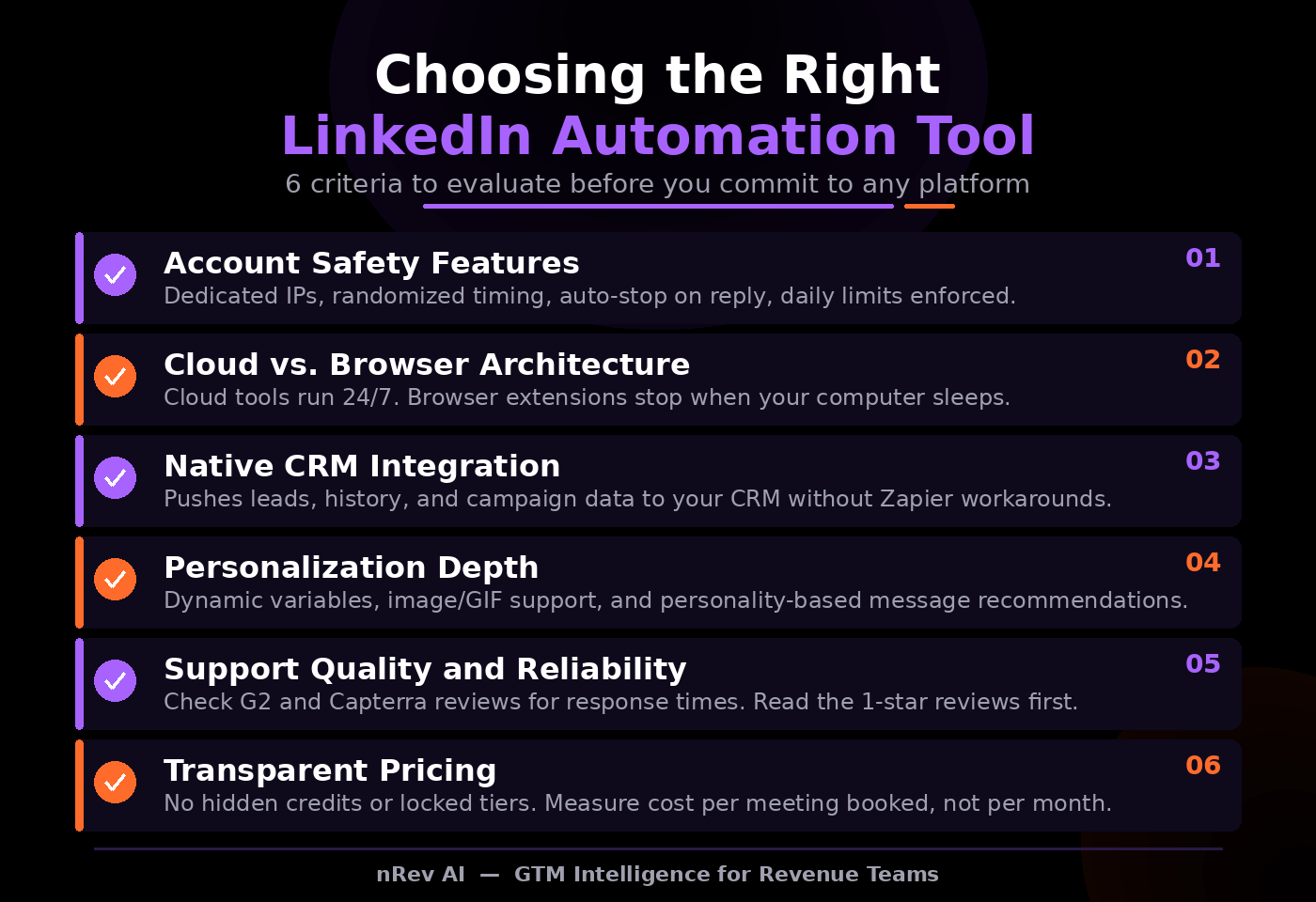
Beyond this list, here is the framework to evaluate any LinkedIn automation tool you are considering, whether it is covered in this guide or not. Use these six criteria before committing to any platform.
1. Account Safety Features
This is the first thing to check before anything else. Does the tool use dedicated IPs? Does it randomize send timing? Does it auto-stop sequences the moment someone replies? Does it enforce daily connection and message limits? If a tool cannot clearly answer yes to all four of those questions, do not use it. No feature set is worth an account restriction.
2. Cloud vs. Browser Architecture
Browser extensions stop running the moment your computer sleeps, your browser crashes, or you close the tab. For any serious outreach operation, cloud-based LinkedIn automation tools are almost always the right choice, especially for agencies managing multiple client accounts where uptime and consistency directly affect campaign performance.
3. Native CRM Integration
Can the tool push enriched leads, conversation history, and campaign data directly into your CRM without a Zapier workaround in between? Native integrations save hours every week and eliminate the data gaps that come from manual exports and third-party connectors. If the answer is "you can connect it via Zapier," that is not native integration.
4. Personalization Depth
Dynamic variables, image personalization, GIF support, and personality-based messaging recommendations are the difference between a message that feels like a genuine outreach and one that reads like bulk spam. In 2026, basic first-name personalization is table stakes. The tools that move the needle are the ones that let you personalize at the level of the individual, not just the list.
5. Support Quality and Reliability
Check G2 and Capterra reviews specifically for support response times and tool reliability before you buy. A tool that works 90% of the time costs you 10% of your pipeline. Always read the one-star and two-star reviews before committing to any paid plan. Support quality during a campaign outage is where most tools reveal their actual reliability.
6. Transparent Pricing
Watch for tools with complex credit systems, hidden per-seat charges, or core features locked behind expensive enterprise tiers. The real cost of a LinkedIn automation tool is not the monthly subscription fee. It is what you pay per meeting booked when you factor in your total stack cost, the time spent on setup, and the pipeline lost to unreliable tools.
Frequently Asked Questions About LinkedIn Automation Tools in 2026
Q1. Is LinkedIn automation allowed by LinkedIn?
Technically no. LinkedIn's Terms of Service prohibit third-party automation. But their real concern is spammy behavior: volume spikes, repetitive messaging, and actions that do not resemble human activity. Tools that mimic human patterns and stay within safe daily limits are widely used by sales and GTM teams without issue. Always prioritize account safety over raw volume.
Q2. Can my LinkedIn account get banned for using automation?
Yes, but it comes down entirely to how you use the tool. Sending 200 or more connection requests per day, blasting identical messages at scale, or logging in from multiple locations simultaneously gets flagged quickly. Stay within 20 to 40 requests per day with randomized timing and you significantly reduce your restriction risk.
Q3. How many connection requests can I safely send per day?
20 to 40 per account is the safe range for established profiles. New accounts should start at 10 to 15 per day and ramp up gradually over 2 to 4 weeks. If you need more volume, use multi-account sender rotation instead of pushing a single account past its safe daily limits.
Q4. Cloud-based vs. browser-based LinkedIn automation tools: which is better?
Cloud-based tools run 24/7 on dedicated IPs, making them significantly safer and more reliable for serious outreach operations. Browser extensions are cheaper but stop the moment your browser closes and carry a higher detection risk. For anything beyond casual, low-volume use, cloud-based is the right choice.
Q5. Do I need Sales Navigator to use LinkedIn automation tools?
No, but it significantly improves your targeting quality. Sales Navigator gives you advanced search filters, more results per search, and richer lead data than the free version of LinkedIn. Some tools on this list require it; most simply perform better with it.
Q6. What can actually be automated safely on LinkedIn?
Connection requests, follow-up sequences, profile visits, lead data extraction, content scheduling, and inbox management can all be automated safely when done within human-like daily limits. Automated likes and comments carry more detection risk and should be used sparingly if at all.
Q7. How long until I see results from LinkedIn automation?
Plan for 4 to 8 weeks for well-targeted campaigns. Weeks 1 and 2 are for warm-up and initial testing. Weeks 3 and 4 are for optimization based on early data. By weeks 6 to 8, you should be seeing consistent meetings booked if your ICP targeting and messaging are properly dialed in.
Q8. Is LinkedIn automation worth it for solopreneurs?
Yes. Start simple: one outreach tool on a free or entry-level plan and one data enrichment tool is a complete and functional stack. Do not overcomplicate it at the start. Scale up only after you have maxed out what the basics can do for your pipeline.
Q9. What is the biggest mistake teams make with LinkedIn automation?
Chasing volume over precision. The gap between a 2% reply rate and a 15% reply rate is almost never the tool or the copy. It is whether you are reaching the right person at the right moment. Signal-based outreach timing consistently outperforms brute-force volume plays.
Q10. How do I choose the right LinkedIn automation tool for my team?
Match the tool to your current stage and team size. Solo or early-stage: start with a free or entry-level outreach tool. Small sales team: a cloud-based sequencer paired with a data enrichment tool. Agency: a multi-account platform with sender rotation. GTM team in a competitive market: add a signal intelligence layer on top of your outreach stack so you reach accounts before your competitors do.
Final Thoughts: LinkedIn Automation in 2026
LinkedIn automation in 2026 is not about sending more messages. It is about reaching the right people at the right time with the right context.
Pick 1 to 2 tools that match your team size and stage. Follow the account safety checklist before launching any campaign. Invest more energy in targeting and timing than in raw send volume. The teams booking the most meetings in 2026 are not the ones blasting 500 connection requests a week. They are the ones who know which accounts are in-market before their competition does.
Stop guessing. Start selling with signals.
Most outreach tools help you send more messages. NRev AI helps you find the right moments, track competitor moves, and prioritize the accounts most likely to convert, before you send a single message.